When cataloguing bibliographic resources it’s important to follow Sitka cataloguing policy to avoid creating duplicate records in the Sitka catalogue. Original cataloguing should be done in Evergreen only if there is no record available in the Sitka catalogue, via Z39.50, or from your vendor.
Sitka’s Evergreen has global MARC templates for commonly catalogued types of resources with the most frequently used fields and subfields included. Libraries can also use a workaround to set up library specific templates.
- Go to Cataloguing → Create New Marc Record.
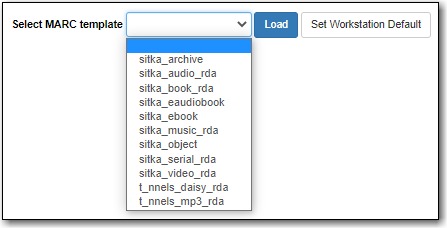
Click on the drop down menu to see the available MARC templates.
Note
Once you select a template you can click Set Workstation Default to set it as your default template.
Select the appropriate template and click Load.

A blank MARC record will load with the fields and subfields most commonly used for the resource type. The Leader and control fields will be coded for the specified type of resource; this coding affects the format icon and search filters.
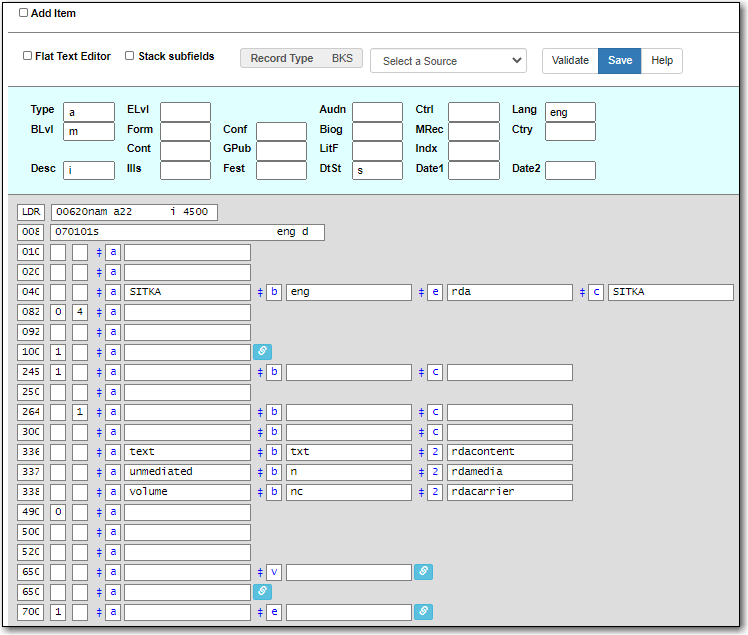
Complete the MARC record using the Enhanced MARC Editor or the Flat Text Editor.
Note
The MARC record must meet the minimum requirements set in Sitka’s cataloguing policy and a good MARC record will exceed the minimum requirements.
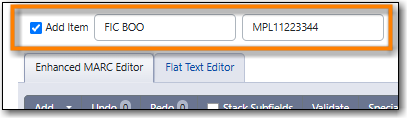
If desired, check the box for Add Item and enter the call number and barcode.
- Click Save Changes.
- The record is created and will open up in the staff catalogue in the browser tab. If the box for Add Item was checked the Holdings Editor will open in an additional browser tab.
Add your holdings to the record.
Note
If you do not add a holding to your record it will be automatically deleted 3 months after its creation date.

