Table of Contents
- Age Overdue Circs to Lost
- Carousels
- Cash Reports
- Circulation Policies
- Closed Dates Editor
- Group Penalty Thresholds
- Hold Policies
- Hold-driven Recall
- Hopeless Holds
- Item Alert Suppression
- Item Tags
- Library Settings Editor
- Non-catalogued Type Editor
- Notifications / Action Triggers
- Patrons with Negative Balances
- Permission Tree Display Entries
- Shelving Location Editor
- Shelving Location Groups
- Shelving Location Order
- Statistical Categories - Item Editor
- Statistical Categories - Patron Editor
- Surveys
- Transit List
- Work Log
The Age Overdue Circs to Lost feature allows you to create a queue of items to be marked lost. ALL overdue items by selected patron profiles at selected libraries will be marked Lost.
Note
This feature does not support a date parameter. ALL overdue items by selected patron profiles at selected libraries will be marked Lost. It is mainly for school libraries' end of term process. To automatically mark items lost when they are overdue for x days, contact Co-op support.
Age Overdue Items to Lost
- Go to Administration → Local Administration → Age Overdue Circs to Lost
Choose the User Profile and Circulation Library for the overdue circulations you wish to age to a Lost status.
- Note the descendants of these values (sub-groups, sub-libraries) will also be affected.
- Check the Are you Sure? check box.
Click Queue for Aging
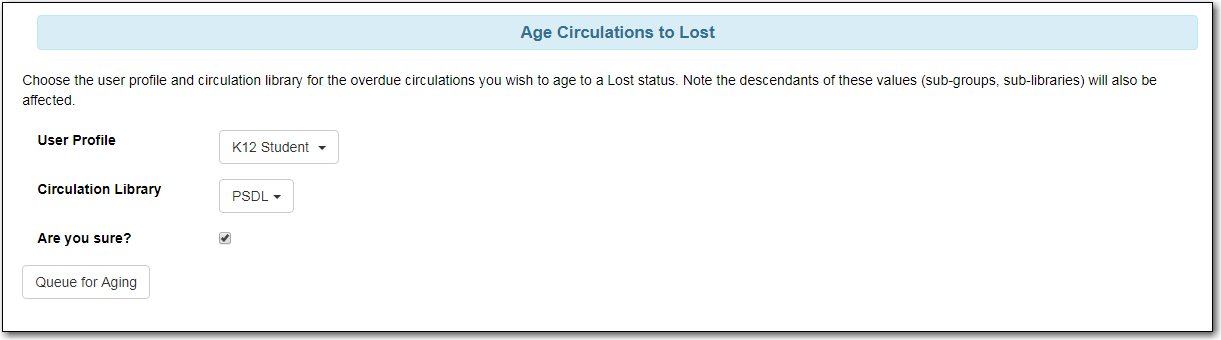
- Evergreen will process the request and create action trigger events for all overdue items for the selected patron profiles at the selected libraries.
You will see a Processing Complete message with a count of Events created.
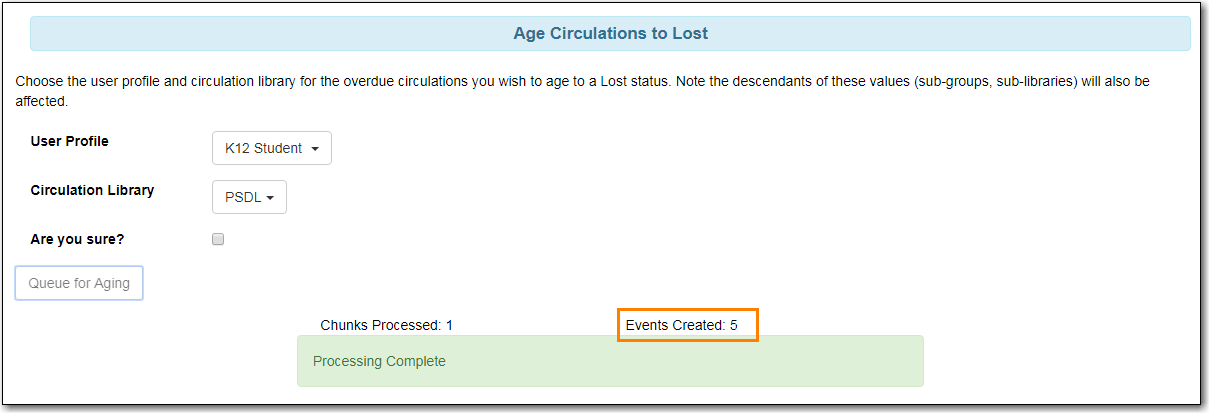
- The number of events created indicates the number of items which will be marked Lost.
Note
Please email Support if you would like this feature turned on for your library. Please indicate if you would like to send an automatic email when the items are marked lost.

