Table of Contents
Note
The following guidelines and workflows have been developed by Co-op Support based on the functionality available in Sitka’s Evergreen and the experience of inventory projects done by libraries in the Sitka consortium and the Evergreen community.
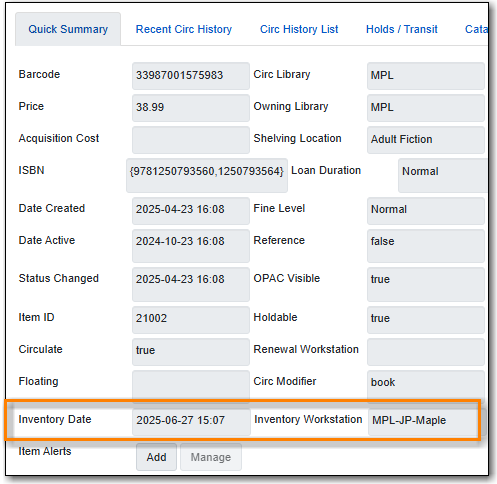
Item records include fields for inventory date and inventory workstation. The values in these fields are updated when an item is inventoried by using the Update Inventory action in Item Status, the Update Inventory checkin modifier at Check In, or enabling Update Inventory with In-House Use.
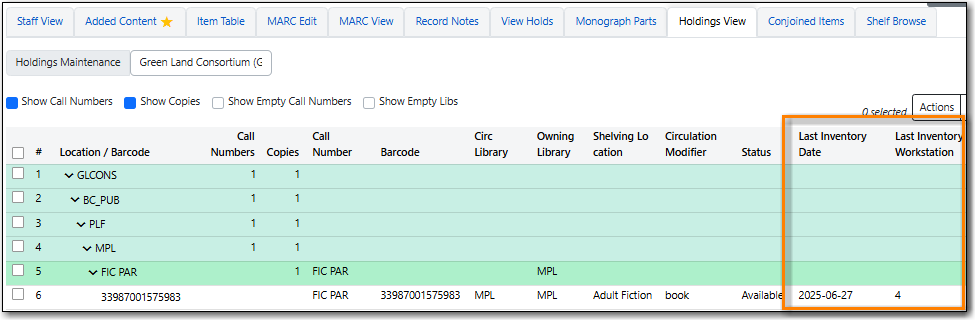
The inventory date and workstation can be seen in several places in the staff client:
Item Status - List View

Item Status - Detail View Quick Summary Tab
Check In

Bibliographic Record - Holdings View
Note
Due to a bug, the inventory workstation in the Holdings View currently displays the workstation database ID rather than the workstation name.

